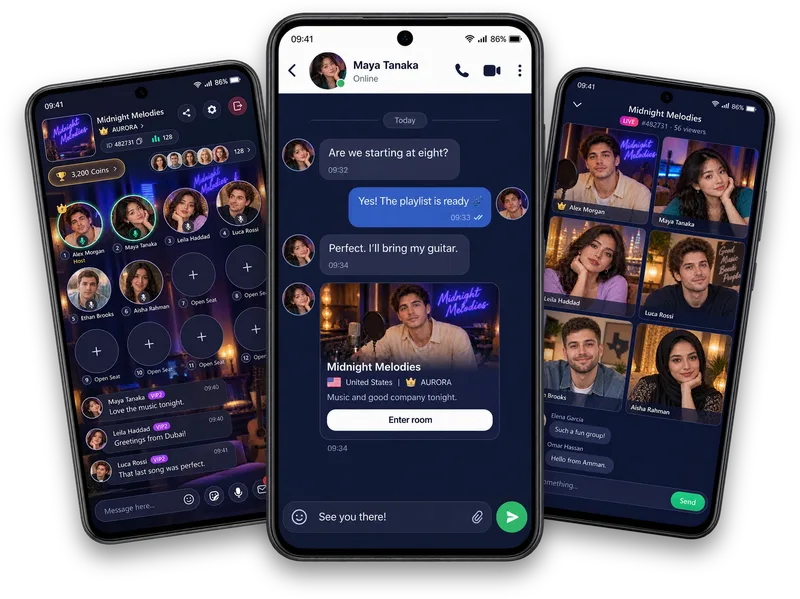
Explore your way
Browse Following, All, New and Calls in Explore. Use Popular, country and Recent filters to find the conversations that interest you.
Live voice chat rooms
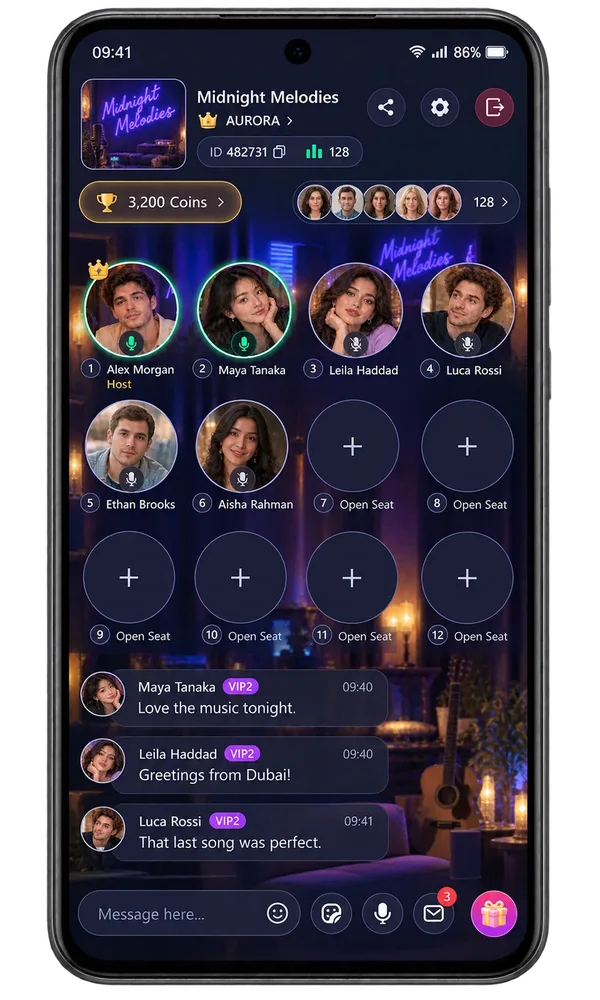
Vozzo is a voice chat app built around live audio chat rooms. Jump into group voice chat with friends or new people, listen to a host and take a speaker seat when you are ready. Rooms hold more than 1,000 listeners, and animated seats light up as each speaker talks. Find rooms by topic or country. Hosts can lock a room with a password and share their screen with everyone in it, free of cost, and Solo Live and Party Live are separate video formats.
Audio rooms
Browse Following, All, New and Calls in Explore. Use Popular, country and Recent filters to find the conversations that interest you.
A permanent room has its own cover, name and country. Recognisable rooms help a community find its way back together.
Preview a room before entering, or prepare your own Audio Room, Solo Live or Party Live when your account is eligible.
Make it your experience
Give your room a clear identity and a topic people can join at their own pace. Hosts can review their own activity in Live Data; listeners can discover a space that feels right for them.
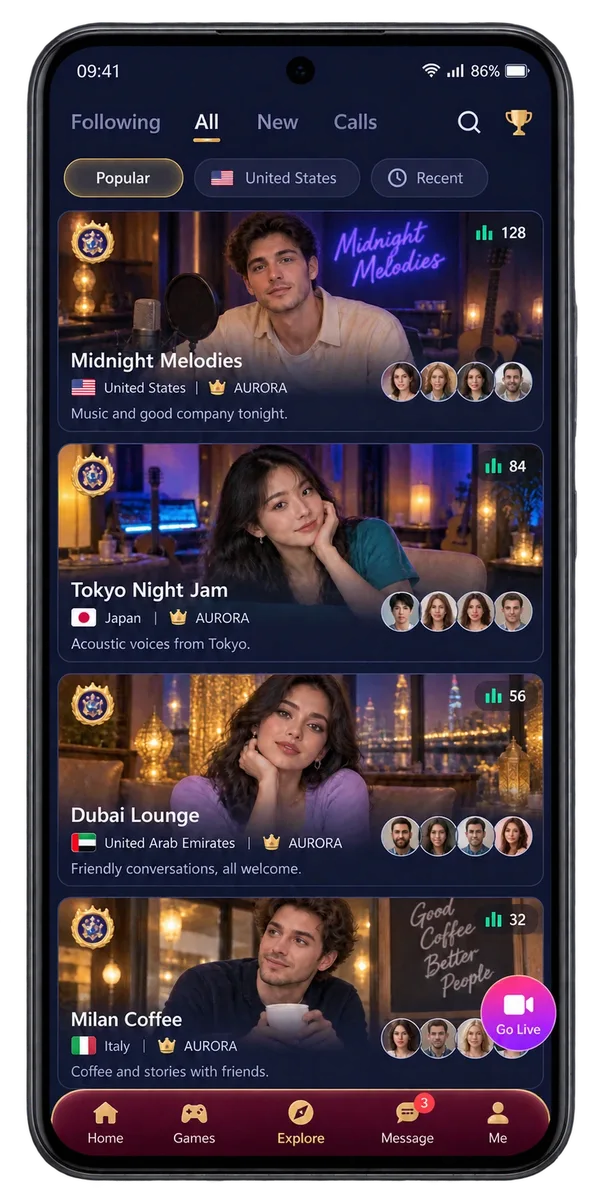
Find your room
Room listings show who is hosting, the cover, the country and what the room is about before you tap in. Pick a conversation that fits your mood, preview it, then join when it feels right.
Room themes
Birthdays, celebrations, weddings, a magic show or a music night: set the scene, then let the seats light up as people talk.
Choose a birthday, celebration, wedding, magic or music design, so your room matches the moment.
Animated seats light up as each speaker talks, so everyone can see who is on the mic.
More than 1,000 listeners can join a single room, and Vozzo can host up to 50,000 rooms.
Questions, answered
Open Explore and browse Following, All, New or Calls, then use Popular, country and Recent filters to narrow your choice. Room listings introduce the host, cover, country, announcement and participation information. Check a room before entering and choose a conversation that interests you. The options available depend on the room and your account.
Create a permanent room with a cover, name, country and a default Audio, Solo or Party mode. Review the country information carefully because the app explains any limits on changing it. Your room gives the community a recognisable identity. Creating or editing that identity is separate from starting a live session.
Open your existing room's Go Live setup, check its identity and edit it if needed. Choose Audio Room, Solo Live or Party Live, then follow the Go Live action when your account is eligible. Host requirements and participation limits apply. The setup screen prepares your session; the active live stage is a separate experience.
The entry preview introduces the room through its cover, title and country. Choose Enter room when you want to join, or Cancel to keep exploring. A locked room asks for the password its host set. The preview helps you make a choice before joining; seats, room chat, gifts and live participants belong to the active session.
Open Live Data to review the periods, room-mode breakdowns and activity totals available to your account. It helps you look back on your Audio, Solo and Party experience from one place. This information belongs to the account holder. Website examples are not public host analytics, real audience totals or promises of a particular result.
Yes. Audio Rooms are group voice chat: a host opens the room, people take speaker seats to talk, and everyone else can listen and join the room chat. Private one-to-one calls are a separate feature.
More than 1,000 listeners can join one Audio Room. Speakers talk from the room seats, which are animated and light up as each person speaks, while everyone else listens and joins the room chat. Vozzo can host up to 50,000 rooms.
Yes. Pick from more than 20 room themes, including birthday, celebration, wedding, magic and music designs, so the room looks the part before the first guest arrives.
Open Explore, browse Following, All, New or Calls and pick a room that sounds like your vibe. Check the entry preview, tap Enter room, then listen, type in the room chat or take an open seat when you want to talk. A locked room asks for the password its host set.
Vozzo handles group voice calls as live rooms. An Audio Room works like a group audio call: several people talk from the speaker seats while more than 1,000 others listen and join the room chat. Private calls on Vozzo are one to one, so open a room when you want to talk with a group.
Yes. Vozzo is a new app that launches on 12 December 2026, built around group voice chat rooms for friends and new people. Download the voice chat room app for Android from the Get Vozzo page once the Google Play listing is live; the App Store version is planned.
Vozzo puts 15 casual games, including Ludo, Chess and Carrom, next to its Audio Rooms, so you can take a game break and come back to the room to talk. Check each game’s modes in the app: a game listing does not promise multiplayer play or in-game voice chat.
It is an app where a group hangs out by voice, like a party. On Vozzo, Audio Rooms are the party voice chat, with more than 20 room themes such as birthday and celebration. Party Live puts six live streams on one party stage when you want to be on camera.
Yes. Vozzo is a voice chat app for India and other countries. Use the country filter in Explore to find rooms from your country, and use the app in English or 16 other languages, including Hindi, Bengali, Tamil, Telugu, Malayalam and Urdu.
A social audio app lets people meet and talk by voice in live rooms instead of posting text or video. Vozzo is a social audio app: hosts open Audio Rooms, speakers take seats and listeners join the room chat.
Yes. The host can share their screen with everyone in the room, so viewers can follow a slide deck, a workshop or a game while people talk from the seats. Sharing starts only when the host begins it, and it is free of cost.
Yes. On match day, open or join a live room for live cricket talk with fans across India and the world, from every IPL match to the T20 World Cup. Rooms are for talking about the game together: Vozzo does not stream match video or live scores.
Yes. Open a room for any Premier League, Champions League or league match and talk football with fans, with no time limit and free of cost. Rooms carry conversation only, not match video.
No. Vozzo rooms have no time limit: keep your room open 24 hours a day, 7 days a week, 365 days a year, free of cost.
Yes. Lock your room and set a password, and only people you give the password to can enter. A password-protected chat room suits a team catch-up, a workshop, a family call or a private party, and it is free of cost.
Yes, for meetings that suit a live room. Lock the room with a password, share your screen and talk from the speaker seats while more than 1,000 people can listen and chat, all free of cost. Our guide compares Vozzo with Zoom, Google Meet and Microsoft Teams.
New to shared audio? Learn how listeners and speaker seats work, then use the welcome and opening-question guide to make newcomers comfortable. Match day? Open a fan room for IPL, cricket and football. Planning a meeting? Compare Vozzo rooms with Zoom, Google Meet and Teams.
Explore all live streaming guides for related topics.
Take your people with you
See the live video, messaging and community features, then check official app download details for your next step.
Get Vozzo